
By default, frames are not editable in version documents.
It is possible, however, to enable and set rules for frame editing on a frame-by-frame basis.
NOTE:
A user may only change the geometry of a frame if there is editable content for that user in that frame (i.e. image, text segment).
Rules for individual frames: click 'Frame Rules' in the frame menu
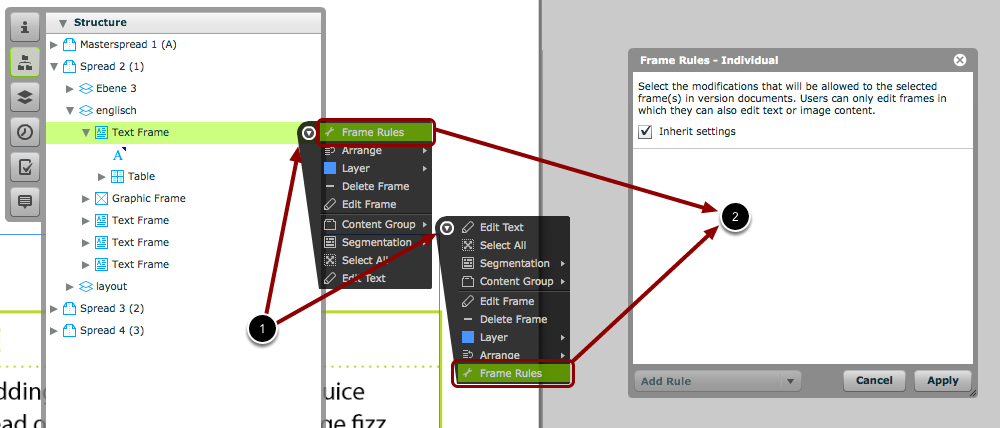
You can set frame rules for each individual frame.
- Move your mouse over the triangle next to the frame in the structure panel (or over the triangle in the top-right corner of the frame) to open the menu for that frame.
- Click 'Frame Rules' to open the 'Frame Rules - Individual' window.
Choose Settings & Click 'Apply'
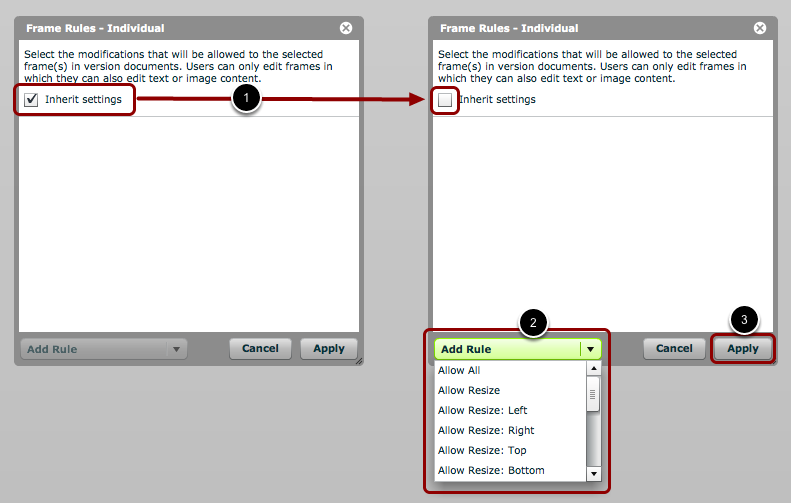
- Inherit settings: By default, all frames will inherit their editing rules from the document-level frame rules (via 'File > Frame Rules'). To override this and create individual rules for this frame, you much uncheck this box.
- Choose/Add Rules: Choose the rules for editing this frame from the drop-down menu. You can choose any combination of rules from this menu.
- Apply: Click 'Apply' to apply these frame rules to the selected frame.
NOTE:
For example, if you choose "Allow Resize", then users will be able to resize all frames containing editable content.
However, if you choose "Allow Resize: Right", then users will be able to resize all frames containing editable content, but only using the right handle of the frame. In other words, the top, bottom and left edges of frames will stay in their original positions.
NOTE:
If you choose 'Allow All' from the rules drop-down menu, it will add 5 separate rules - resize, move, scale, rotate, and skew.
NOTE:
If 'Inherit settings' is unchecked and no rules are chosen, then this frame will not be editable in this project.