
By default, frames are not editable in version documents.
It is possible, however, to permit frame editing on a document-wide basis for a specific workflow step.
NOTE:
A user may only change the geometry of a frame if there is editable content for that user in that frame (i.e. image, text segment).
Setting Frame Rules per Workflow Step
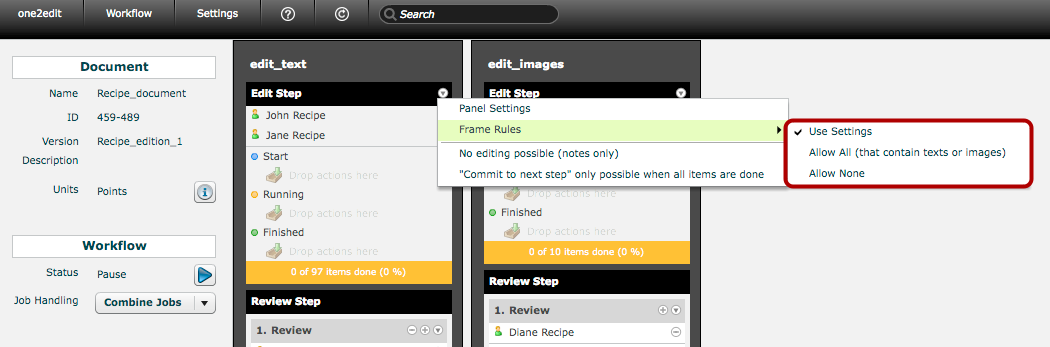
Frame-editing can be enabled for each Workflow Step.
Click on the triangle next to the workflow step name to open the menu for that step.
The 'Frame Rules' sub-menu shows 3 options:
- Use Settings: This is the default setting. Users at this step are beholden to the rules set up in the master document 'Frame Rules' windows (i.e. the document-wide or individual-frame settings).
- Allow All (that contain texts or images): Users at this step can edit any frame in this document that contains editable content. This command overrides all rules set up in the master document 'Frame Rules' windows (i.e. the document-wide or individual-frame settings).
- Allow None: Users at this step cannot edit any frames. This command overrides all rules set up in the master document 'Frame Rules' windows (i.e. the document-wide or individual-frame settings).
NOTE:
Permitting frame editing for a workflow step can be useful if, for example, a designer/copy-fitter is working at a specific step in the workflow, but no other workflow steps should be allowed to edit frames.