
Projects are organized in folders. It is recommended to create a folder structure you are comfortable working with.
This lesson demonstrates how to create a folder structure by moving folders.
NOTE:
An initially created folder structure might be outdated at some point. As individual folders can easily be moved a folder structure can quickly be adapted to your current needs.
Drag and drop folder
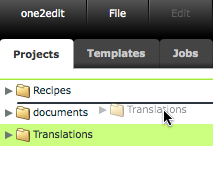
If you want to change the sequence of your folders just drag and drop them into the desired position. The black line demonstrates the new position of the folder once it is dropped.
New folder structure
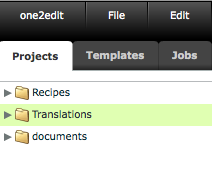
The recently dropped folder will remain selected for further use.
Move subfolder
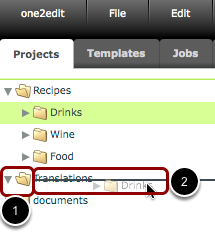
If you wish to move a subfolder into another folder, the target folder needs to be opened first. An opened folder can be recognized by the arrow pointing downwards and the folder symbol being opened (1). Now, select the folder that you want to move and drag and drop it into its new position. You know you have the right position to create a subfolder if the black line is directly on the name of the target folder (2).
New position of subfolder
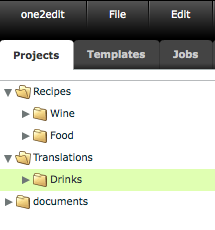
The subfolder has been dropped into the target folder. It will remain selected for further use.