
The ‘return/enter’ key will insert a line break (soft return) by default instead of a paragraph character (hard return).
If the user is not allowed to insert paragraph characters, the user is also not allowed to delete them.
If a user is required to insert or delete paragraph characters during a one2edit™ job, a content rule must be set up to allow this.
NOTE:
This only applies to text-editing in the Job Editor. The 'return/enter' key will insert hard returns by default in the master document.
Allow 'Paragraph character' to be inserted/deleted
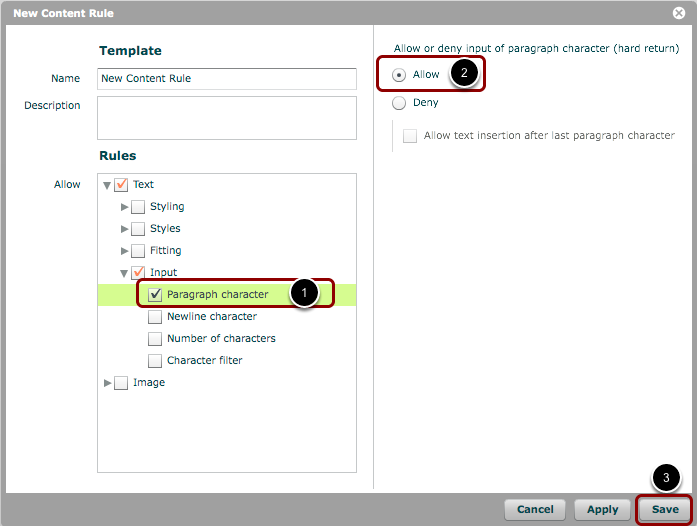
In your content rule ('Settings > Content Rules (Policies)'), do the following:
- Check the box for: 'Text > Input > Paragraph character'.
- Ensure the option is set to 'Allow'.
- 'Save' your settings and the window closes.
A user can now use 'Enter' to insert hard returns, and 'Shift+Enter' to insert soft returns (line breaks) in any job to which this rule is applied.
NOTE:
This option can be set in in existing content rules, or you can create a new rule specifically for it. If you create a new ruleset, you will need to explicitly add it to the content group for your job. Please see the workshops about how to set up projects in one2edit™ for more details on this.
NOTE:
Setting this rule will also allow users to delete paragraph characters from existing text.