
Any download links that are generated automatically by one2edit™ will expire after 7 days. At this time, the generated file will also be deleted. This stops the one2edit™ system from filling up with old files.
This lesson will show you how to insert an 'expiry date' into the email containing the download URL.
NOTE:
This expiry date only applies to files that are generated for download. If a file is generated and placed on a hard-drive, it will obviously not "expire".
NOTE:
If a filename contains slashes ("/" or "\"), then it will not be possible to generate the file for download.
Export Document as Normal
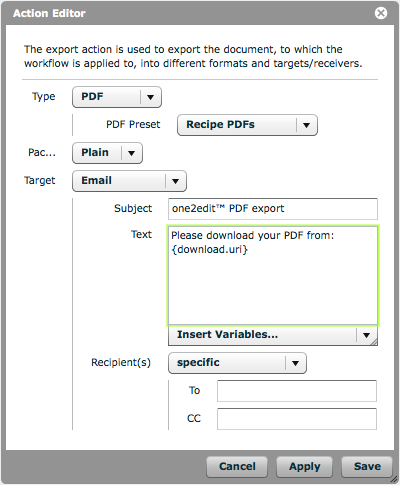
Set up your 'Export Document' workflow action as normal by choosing the export file type and creating an email using the 'download.uri' variable, as shown.
Insert Expiry Date Variable
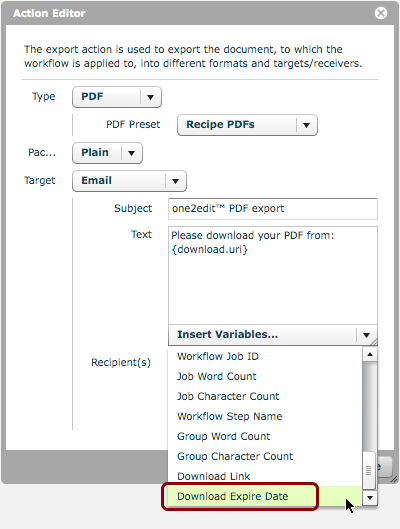
At the bottom of the list of email variables, there is a variable called 'Download Expire Date'. You should insert this into an appropriate area of the email body text.
This will become the download expiry date for the generated file, i.e., 7 days from when this action is called and the file is generated.
Save Export Action
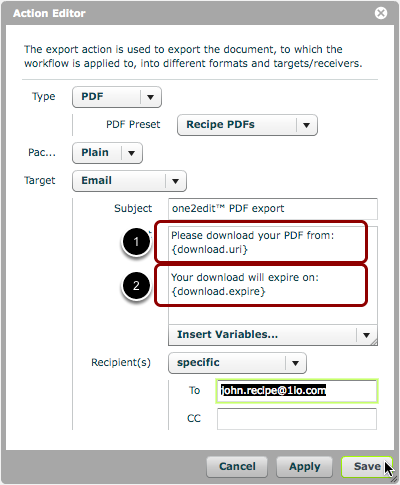
All you need to do now is enter a recipient (if you have not already done so) and save your 'document export' action settings.
When this action is called, an email will be sent to the recipient containing both:
- the download link for the generated file (in this case, a PDF)
- the expiry date of this download link