
When a document is linked to a project on the one2edit™ Express system, a symbolic link (symlink) is created to the 'Document fonts' subfolder (if one exists).
A symlink may not contain certain characters (e.g. characters with umlauts, accents, etc.). Therefore, if the path to the 'Document fonts' folder contains such characters, the creation of the symlink will fail. This will, in turn, throw an error with the ID of 2.
For simplicity, when creating any folder or filename on the asset server, it is safest to use the character ranges 'a-z', 'A-Z', and '0-9'.
NOTE:
For detailed information about what characters a symlink may contain, please see RFC2224 and RFC1808.
Folder contains umlauts
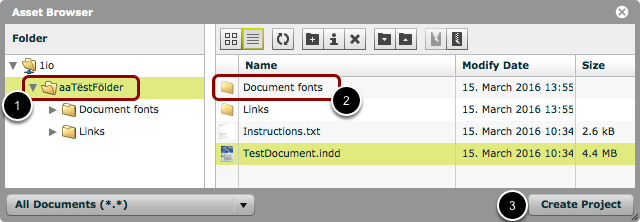
- In the above example, the folder name contains characters with umlauts (i.e. the name is 'aaTëstFölder').
- The folder has a subfolder named 'Document fonts'.
- When I click 'Create Project', I will get an error.
To resolve this, either remove the accented characters from the folder name, or change the name of the 'Document fonts' folder.